Filter Vinted listings with AI
Describe what you want in your own words. After your search and custom filters, the AI Filter checks each new listing's text and photos and skips clear mismatches. Included in every plan.
Some requirements don't fit a filter field: a dock that must be included, a label that must show enough wool, or wear you can live with. The AI Filter is an optional extra step for those, on top of the Vinted search filters you already use.
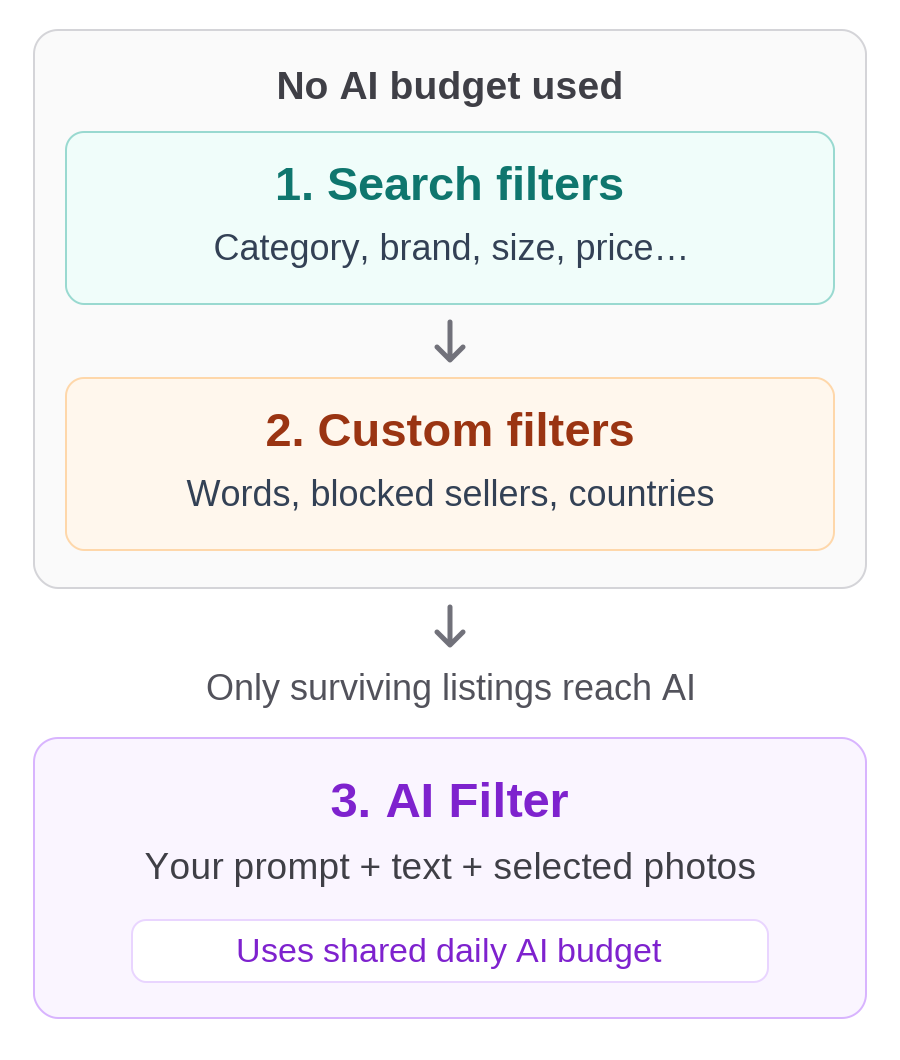
How the filters stack
- 01
Search filters pick the listings
Choose the Vinted market and category, then set fields such as brand, size, condition and price. Only listings that match your search go any further.
- 02
Custom filters apply your rules
Include and exclude words, blocked sellers, seller countries and seller ratings remove more listings. AI never sees a listing these filters removed, and it can't bring one back.
- 03
AI checks what's left
The AI Filter compares each remaining new listing's details and up to five of its photos with what you wrote. Clear mismatches are skipped; everything else reaches you as usual.
Example prompts
Accessories that must be included
Only show Nintendo Switch consoles with both Joy-Cons and the dock included in the sale. Skip Switch Lite models, accessory-only listings and empty boxes.
AI can tell a console sold with its dock from a dock sold on its own. If the seller says an accessory isn't included, that counts even when a photo shows it.
A readable material label
Only keep jumpers with a readable material label showing at least 80% wool. Reject visible holes or large stains.
AI reads the label in the photos as well as the seller's material field. It only sees selected photos, so a jumper without a clear label photo may not qualify.
Wear you can live with
Reject trainers with visible holes or soles worn smooth. Light creasing on the uppers is fine.
Draw the line between wear you accept and damage that rules an item out. AI judges what's visible, so hidden damage still needs your own check.
What the AI Filter can't do
Check authenticity
It judges the listing's text and photos only. It can't verify that an item is genuine, so check each listing yourself before you buy.
Look up prices
It can't compare prices with the market or predict resale profit. Set your budget with the regular price filter.
Hide uncertain listings
When AI is unsure or can't assess a listing, the listing still reaches you. Listings it rejects stay under Rejected, where you can move them back to your results.
Still experimental
We're still testing the AI Filter. Depending on how it performs, we may change how it works, adjust its limits or remove it. If that happens, your alerts keep running with your regular filters and your prompt is kept.
Included in every plan
AI alerts are regular alerts with the AI Filter switched on. They count toward your plan's alert limit; they aren't extra alerts.
AI alerts per plan
- Free Trial
- All 2 alerts
- Casual
- 2 of 7 alerts
- Premium
- 5 of 25 alerts
- Ultra 3
- All 3 alerts
- Ultra 7
- All 7 alerts
- Ultra 11
- All 11 alerts
Your AI alerts share a daily AI budget. When it's used up, they pause until the daily reset, and alerts without AI keep running.
AI Filter FAQ
What is the AI Filter?
The AI Filter is an optional, experimental extra filter for your alerts. You describe what you want in your own words, in any language: for example, a console with the dock included or a jumper with at least 80% wool.
Your Vinted search filters and custom filters, such as word lists and blocked sellers, run first. AI then checks each new listing that passes them, using its text and up to five photos. Clear mismatches go to the alert's Rejected listings instead of your results. If AI is unsure or can't assess a listing, the listing still reaches you.
For setup steps and prompt examples, read our AI Filter guide.
Does the AI Filter cost extra?
No. The AI Filter is included in every plan at no extra cost, within your plan's AI alerts. AI usage is shared across your AI alerts each day. If it runs out, your AI alerts pause until the daily reset, while alerts without AI keep running.
How many AI alerts can I use?
AI alerts are regular search alerts with the AI Filter switched on, so they count toward your plan's alert limit. They aren't extra alerts.
- Free Trial: 1 of your 2 alerts
- Casual: 1 of 7
- Premium: 2 of 25
- Ultra 3: all 3
- Ultra 7: 5 of 7
- Ultra 11: 7 of 11
Switch AI off on one alert to use it on another.
Is the AI Filter experimental?
Yes. We're still testing the AI Filter. Depending on how it performs, we may change how it works, adjust its limits or remove it. If that happens, your alerts keep running with your regular filters and your prompt is kept.
Can the AI Filter make mistakes?
Yes. AI only sees the listing's text and up to five photos, and it can misjudge a listing. If it's unsure or can't assess a listing, the listing still reaches you. Listings it rejects go to the alert's Rejected listings, where "Move to results" brings one back.
The AI Filter doesn't verify authenticity or test items, and it doesn't look up prices or predict profit. Always check a listing yourself before you buy.
What does the AI Filter see?
The listing's details, such as its title, description and price, up to five of its photos, and the preferences you write. These are sent to one of our AI providers, OpenAI or Perplexity, to assess the listing. This only happens for alerts with the AI Filter switched on, and we never need your Vinted login.
Read more in our privacy policy.
Why did my AI alert pause?
AI usage is shared across all your AI alerts each day. When today's AI usage reaches 100%, your AI alerts pause and resume automatically after the daily reset. Alerts without AI keep running.
Don't want to wait? Switch off the AI Filter on the paused alert to continue without AI; your prompt is kept. Narrower search and custom filters send fewer listings to AI, so your daily usage lasts longer.
Try the AI Filter on your next alert
Start a free trial, set your usual filters, then describe what else matters to you.
Start free trial