Filter Vinted by seller rating
Set a minimum star rating, require a review count, or exclude sellers without reviews. Choose the requirements for each alert.
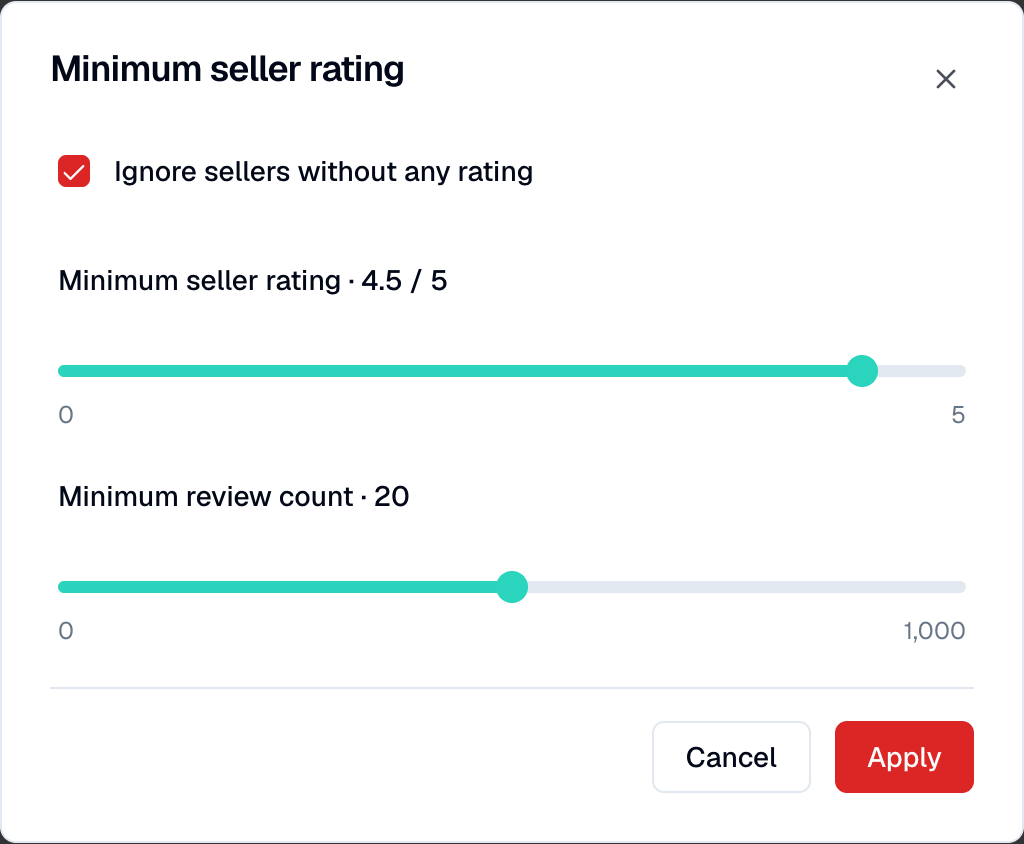
How seller rating filters work
- 01
Open the seller settings
Create or edit an alert, select your Vinted marketplace and category, then open Minimum seller rating under Custom filters.
- 02
Set your requirements
Choose 0 to 5 stars in 0.1-star steps and a minimum review count up to 1,000. Use Ignore sellers without any rating to exclude sellers confirmed to have no reviews.
- 03
Apply, then save the alert
Select Apply to update the form, then save the alert to keep your changes. You can use different seller requirements for each search.
Examples of seller requirements
At least 4.5 stars and 20 reviews
Example: set the star minimum to 4.5 and the review minimum to 20. Sellers with known values below either threshold are excluded.
Keep sellers without reviews
Leave Ignore sellers without any rating off and the review minimum at 0. Sellers confirmed to have zero reviews can then pass the star minimum.
Exclude unrated sellers
Turn on Ignore sellers without any rating to exclude sellers confirmed to have zero reviews. You can combine this with a star minimum.
Set seller preferences for your next alert
Choose the stars and review count you want to filter on. Check each listing before buying; ratings do not verify its condition or authenticity.
Create an alert