Last updated
The best Vinted alerts do two jobs: they find the right listings, and they reach you while the item is still buyable. A broad saved search only makes your phone noisy. A useful alert starts with narrow search rules, then delivers a fast notification when a real match appears. That is the workflow InstantAlert is built around.
In this post: Native saved searches · Search setup · Step-by-step setup · Alert speed · Weekly tuning
What are Vinted alerts, and when do they help?
Vinted alerts are notifications for new listings that match a search you care about. In the simplest version, you decide the brand, size, category, condition, and price ceiling. Then you wait for a matching item to appear instead of opening Vinted every few minutes.
If you already know the seller and want to inspect their current listings once, start with the free Vinted wardrobe search. Alerts cover the other job: continuing to watch for listings that do not exist yet.
That sounds small until you use it on a fast-moving search. A clean pair of trainers in a common size, a Barbour jacket under market price, a kids' ski suit in winter, or a badly photographed designer bag can sell before a casual buyer even sees it. The problem is being early enough to act.
Vinted itself is built for browsing. Its own help on finding items describes the usual path: search, filter, use the feed, and save searches. That is good for discovery. It is weaker for the moment where a listing appears at 7:14 and is gone by 7:20.
The same pressure is visible in the market data. Vinted reported EUR 10.8bn in marketplace GMV for 2025, up 47% year on year. ThredUp's 2026 resale report projects the global secondhand apparel market reaching USD 393bn by 2030. More buyers watching the same brands means the obvious bargains get less time on the shelf.
An alert helps when the item is specific enough that you would open the notification almost every time. It is not for "jacket under EUR 50." It is for "Barbour Bedale, men's medium, very good condition, under EUR 90." The tighter the search, the less your phone turns into a slot machine.
Why are native saved searches too slow for good deals?
Native saved searches are useful, but they still make you do the timing work. Vinted's own saved-search help describes saving a search so you can return later and see whether new uploads match it. That "return later" part is the gap.
If you are buying casually, that gap is fine. You might check after work, browse a few new items, and enjoy the hunt. If you are chasing a rare size, a specific brand, or stock for resale, that gap is where the prepared buyer wins.
Native saved searches also require discipline. You open the app for one saved search, see ten other things, drift into the feed, and forget why you opened it. The app is doing its job. Your job is narrower: notice the match and decide quickly.
That is why real-time alerts for new Vinted listings matter. They move the checking work away from your thumb. You set the search once, and the system watches it. When a match appears, you get the chance to open it while the listing is still fresh.
This is also where InstantAlert is different from manual refreshing. Refreshing feels active, but it has no memory and no patience. You are fast only while you are staring at the screen. An alert can watch while you are making coffee, packing parcels, commuting, or sleeping. It still will not guarantee the item, but it removes the worst failure: finding out too late because you were not in the app.
Build a high-signal saved search first
The alert is only as good as the search behind it. If your saved search is vague, instant delivery only sends bad matches faster. Before you touch notification speed, write down what would make you buy immediately.

Start with the boring fields because they do most of the work:
- Category: pick the real item type, not the nearest broad category.
- Brand: use the exact brand where possible, plus variants if sellers misspell it.
- Size: only include sizes you would actually buy.
- Condition: set the lowest condition you can live with before the alert fires.
- Price: use your total budget minus likely shipping and buyer protection.
- Country: narrow the seller location if delivery time or postage changes the deal.
If you are a reseller, start from your buy box rather than your taste. A buy box is the written rule for what stock you will buy: brand, size range, maximum buy price, likely resale price, defects you reject, and the profit that makes the work worth doing. The post on protecting your Vinted margin when sales slow goes deeper on that math. The short version is simple: do not ask an alert to decide your margin for you.
For buyers, the same rule works with less arithmetic. If a listing needs to be your size, under EUR 40 total, and from a nearby seller, put those limits into the search. If a word often ruins the item, plan to exclude it later.
One strict alert is better than five loose ones. Loose alerts train you to ignore your phone. Strict alerts teach you that a ping is worth opening.
How do you set up an InstantAlert step by step?
The setup flow is practical. You do not need to hand over your Vinted password, run a browser extension, or keep a laptop awake. You create the search in InstantAlert, choose how you want to be notified, and let the service check in the background. The full product flow is on how InstantAlert works, but here is the setup as a working checklist.
First, choose the Vinted country you want to watch. This matters because Vinted markets differ. The Netherlands, France, Germany, Spain, Italy, Belgium, and the UK do not all have the same stock at the same prices. A nearby buyer may start local. A reseller hunting a German workwear brand may start with Germany.
Check the Vinted countries and connected regions map before duplicating alerts, so you can see which sources overlap and which ones add a different seller pool.
Second, add the normal Vinted filters. Search term, category, brand, size, colour, material, condition, and price are the base layer. InstantAlert mirrors those Vinted filters so the alert starts with the same practical limits you would use inside Vinted.
Third, choose the alert destination. Email is useful if you are working at a laptop. Push notifications are better if the item is likely to sell fast. A good setup uses the channel you will actually notice.
Fourth, save the alert and wait for the first few matches. Do not judge it from the first notification. Ten listings tell you whether the search is too broad, too narrow, or just right.
Fifth, tune. If the alert fires on accessories, add exclude words. If it misses good listings because sellers use weird terms, add include words. If delivery keeps killing the deal, adjust country or price. The best alert usually takes one week of small changes.
Which filters stop noisy Vinted alerts?
The filters that stop noisy Vinted alerts are the ones that remove predictable bad matches before they reach you. In InstantAlert, the most useful extra layer is reusable word and seller filtering: must-include words, must-exclude words, blocked sellers, and seller country.
Must-include words are good when a search needs at least one extra signal. A search for "wool coat" might also require cashmere, alpaca, Max Mara, virgin wool, or a brand list. That stops the alert from firing on every coat that happens to include the word "wool."
Must-exclude words are better when the bad matches repeat. A search for "iPhone" may need to exclude case, charger, screen protector, holder, and dock. A trainer search may need to exclude kids, replica, dupe, style, or inspired. Do not try to be clever. Write down the words that annoy you after real alerts arrive, then block those.
Blocked-seller lists are for personal memory. If a seller keeps listing items with copied photos, bad descriptions, or prices that never work for your margin, add the username to a reusable list. That does not prove anything about the seller. It simply keeps your own alert clean.
Seller-country filters are for delivery and sourcing strategy. A buyer may want nearby countries for faster arrival and lower postage risk. A reseller may watch a country where a certain category is cheaper. The point is control: you decide which markets are worth hearing from.
The advanced Vinted filters playbook covers those filters in detail. For this guide, the practical order is: start with native filters, run the alert for a few days, then add the advanced layer only where real noise appears.
How fast should a good alert workflow be?
The right speed depends on the item. A generic black jumper does not need minute-level checks. A rare jacket, underpriced electronics listing, kids' winter gear in season, or a profitable resale buy might.
InstantAlert currently checks saved searches every 10 minutes on Free, every 3 minutes on Pro, and every 1 minute on Premium. The current pricing table shows those intervals alongside alert limits. Lower is faster, and the difference is not theoretical when a listing only lasts a few minutes.
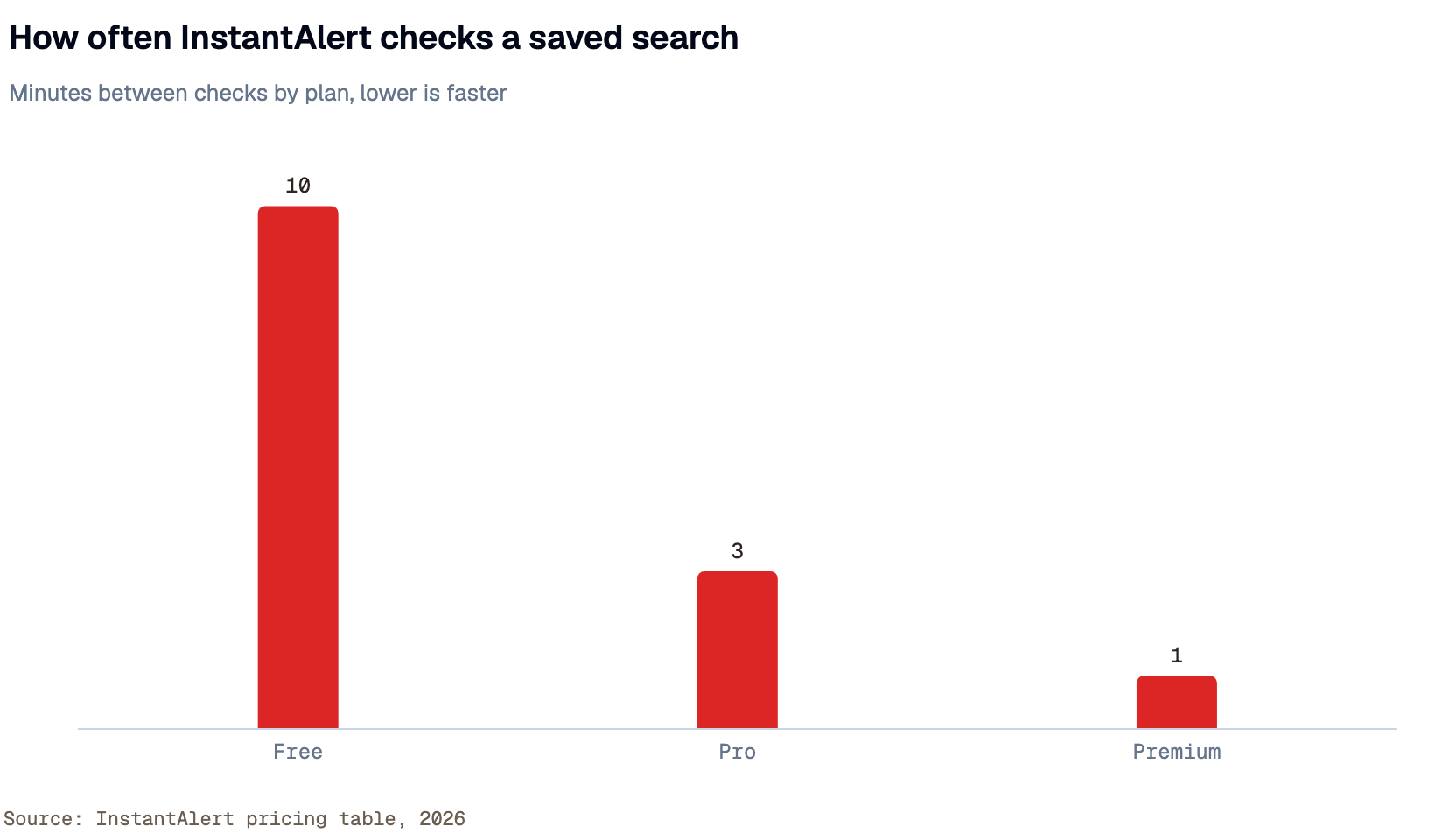
Use the slower plan for slower searches. If you are watching a niche brand in an uncommon size, a 10-minute check may be enough. If you are watching something lots of buyers want, such as Sambas, Carhartt jackets, baby carriers, skiing gear, or a popular console, faster checks become more useful.
There is still a ceiling to what speed can do. A one-minute check cannot force the seller to choose you, fix a vague photo, or make a bad price good. It simply gives you a cleaner chance to open the listing while it is still alive. That is the honest advantage.
I would upgrade speed only when the search has already proved it deserves it. If alerts arrive late and the item is repeatedly sold before you can open it, faster checks are worth testing. If alerts arrive on time but you keep passing, the problem is the search, not the plan.
Why InstantAlert beats manual refresh and generic alerts
InstantAlert is better than manual refresh because it separates watching from deciding. Your job is to decide whether the listing is worth buying. The service's job is to watch the search, apply the filters, and notify you. That division matters because most people are bad at refreshing consistently, especially when nothing happens for hours.
It is also better than generic marketplace alerts when you care about Vinted-specific details. A generic alert tool may watch a search term. InstantAlert is shaped around Vinted searches: country, category, brand, size, price, condition, word filters, blocked sellers, and notification delivery. That means the alert can be narrow in the same way your buying decision is narrow.

The other difference is privacy. InstantAlert does not need your Vinted login to work. That is deliberate. Any tool asking for your Vinted password is asking for more trust than an alert service should need. For buyers and resellers, that matters almost as much as speed.
Compared with competitor apps, the stronger InstantAlert setup is the mix of fast checks, transparent plan limits, reusable filters, push and email notifications, and cross-country support. You can keep a strict personal workflow instead of accepting whatever broad notification a marketplace app decides to surface. You also keep the final click human: InstantAlert notifies, but it does not auto-buy, message sellers, or pretend every match is safe.
That last limit is a feature, not a weakness. Blind speed creates bad buys. Good alerts create early, calm decisions.
Keep the alert useful after the first week
The first week is when your alert teaches you what you got wrong. Treat every bad ping as tuning material.

If the alert fires too often, do not mute it. Tighten it. Lower the price ceiling, narrow the size, add must-include words, or exclude the recurring junk terms. If the alert never fires, widen one thing at a time. Add one nearby country. Raise the price ceiling slightly. Remove a too-specific word. Do not change five fields at once or you will not know what fixed it.
If alerts arrive but the items are already sold, test faster checks on that one search rather than upgrading everything. Your slow categories can stay slow. Put speed where the market proves it matters.
If alerts arrive and you keep hesitating, write down why. Maybe the photos are always weak. Maybe the shipping turns the deal bad. Maybe the condition is worse than your search suggests. Maybe the category is more competitive than you thought. That note is not admin work. It is how your next alert gets better.
Use a simple weekly review:
- Count how many alerts arrived.
- Mark how many you opened.
- Mark how many were worth considering.
- Mark how many you bought or saved.
- Add one include word, exclude word, seller block, country change, or price tweak.
Do that for two weeks and the alert changes from a noisy feed into a small buying system. That is the real reason someone needs Vinted alerts: not because checking the app is impossible, but because checking the app by hand is a bad use of attention. Let the system watch. Save your judgment for the listing that is actually worth opening.
If you want to test the workflow, start with one search you already care about. Make it strict. Run it for a week. Tune it from real results. Then decide whether more alerts, faster checks, or advanced filters are worth paying for.